

Introduction: When AI Meets the Real World
Anyone can transcribe clear, studio-quality audio. But real-world content—vlogs, on-site interviews, street recordings—is messy.
When a speaker suddenly switches languages, when background traffic drowns out a voice, or when an interviewee has a heavy accent, traditional AI transcription breaks down. This forces creators into hours of tedious manual correction.
Today, SubEasy is proud to introduce our brand-new transcription model. We didn't just improve general accuracy; we specifically engineered this model to tackle the four most frustrating scenarios creators face.
Here is how the new model performs when put to the test.
1. Multilingual Mixed Audio (Code-Switching)
The Pain Point: In international business meetings or modern travel vlogs, speakers often switch between languages mid-sentence (code-switching). Most existing models force transcribed audio into a single primary language, turning the secondary language into gibberish.
The New Model Solution: Our new model intelligently detects language shifts instantly. As seen in the comparison below, where the speaker switches from English to Spanish, the new model seamlessly transitions and captures both accurately.
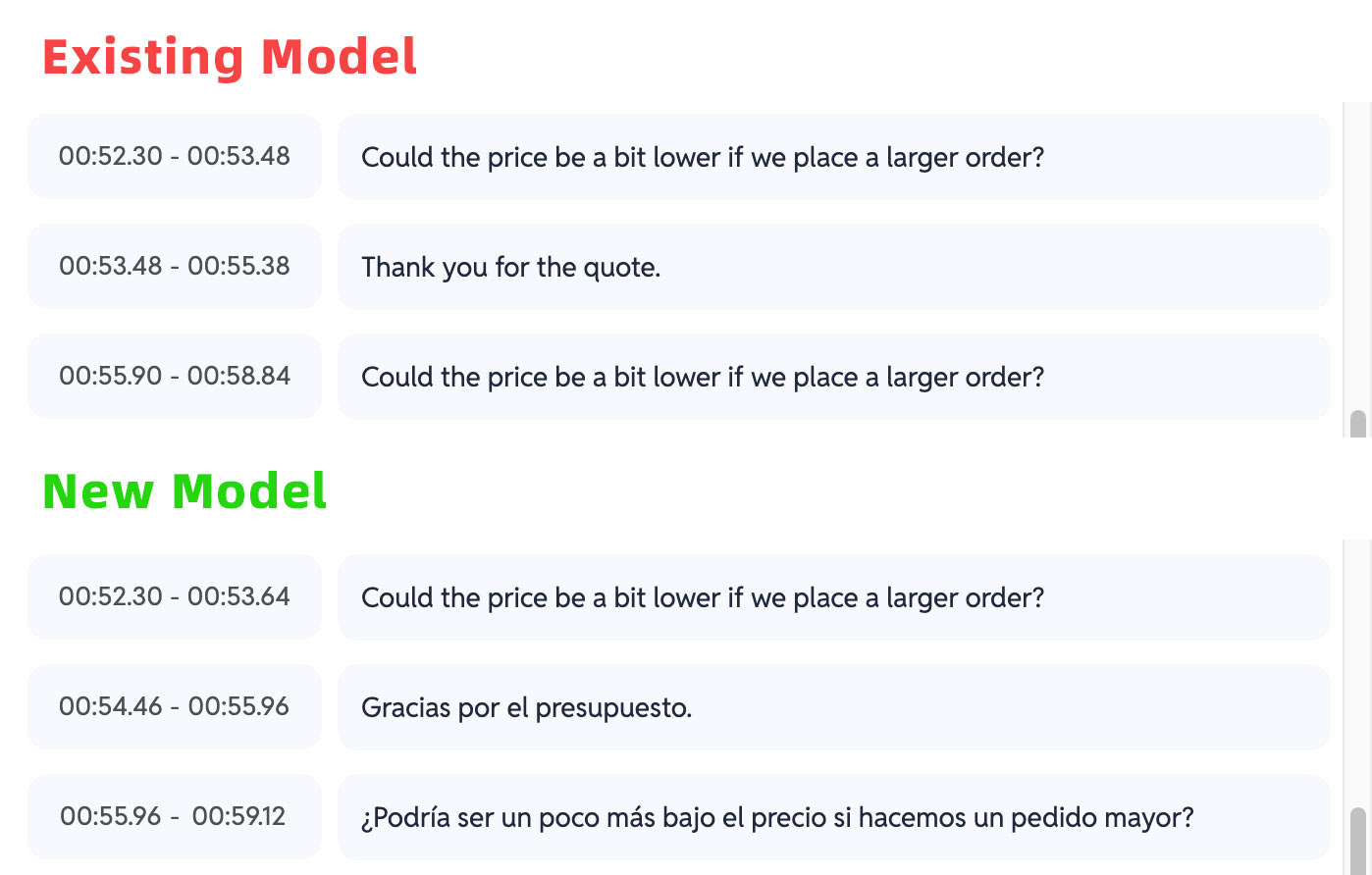 A comparison showing the existing model struggling with Spanish segments, while the new model accurately transcribes the mixed English and Spanish audio.
2. Noisy Environments
The Pain Point: Wind noise in outdoor shots, busy cafe chatter, or subway announcements often overpower the primary speaker, causing traditional models to skip whole phrases or transcribe noise as words.
The New Model Solution: Advanced audio processing isolates human speech from complex background noise, maintaining high accuracy even in low signal-to-noise environments.
📝 Demo Scenario: A busy subway station vlog
- Existing Model: "...going to... (inaudible noise) ...station today."
- New Model: "Even though it's super crowded here, I am still going to the station today."
3. Heavy Accents and Non-Standard Pronunciation
The Pain Point: Strong regional or non-native accents often cause massive drops in transcription accuracy, as older models rely too heavily on standard pronunciation patterns.
The New Model Solution: Trained on a vast, diverse global dataset, the new model uses superior contextual understanding to decipher what was meant, even if the pronunciation varies from the "standard."
📝 Demo Scenario: Heavy Japanese accent speaking English (Japanglish)
- Audio Context: A speaker pronouncing "McDonald's" with heavy Japanese phonetic influence (e.g., "Makudonarudo").
- Existing Model: "I want to eat mark donald road." (Phonetic misinterpretation)
- New Model: "I want to eat McDonald's." (Contextual recognition)
4. Specialized Cantonese Recognition
The Pain Point: Cantonese is a distinct language with unique syntax and specific characters that do not exist in Mandarin. Generic models often force-transcribe Cantonese audio into incorrect Mandarin homophones, changing the meaning entirely.
The New Model Solution: We have included specialized modeling for Cantonese, ensuring it accurately recognizes specific Cantonese grammar and localized characters.
📝 Demo Scenario: Casual Cantonese conversation
- Existing Model (Incorrect Mandarin characters): "你依家系度做勿?我好中意食那个。"
- New Model (Correct Cantonese characters): "你依家系度做乜?我好钟意食嗰个。"
How to Use the New Model
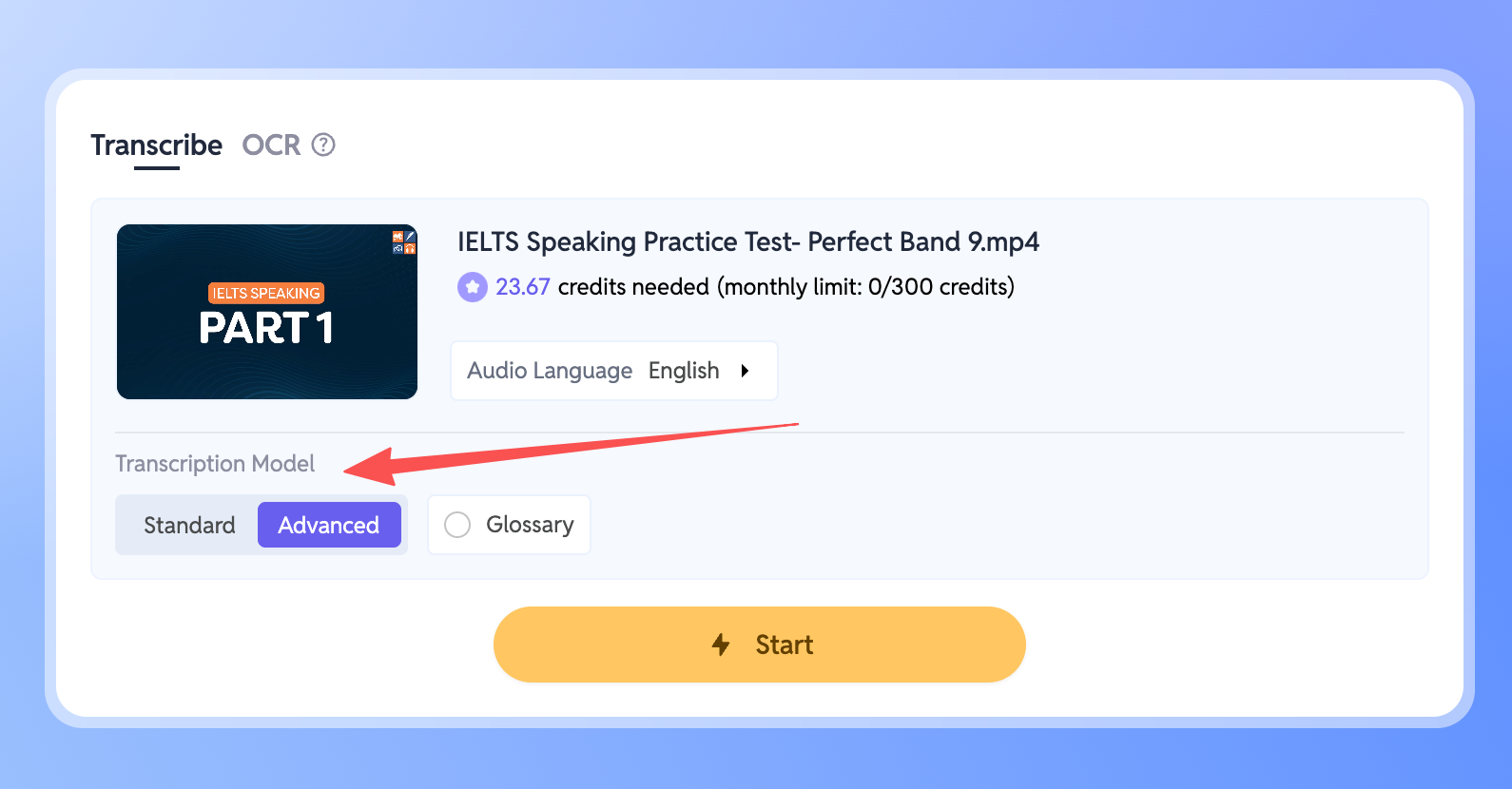
- Go to your Workspace and select the file you wish to transcribe.
- Locate the Transcription Model setting in the panel.
- Simply switch the mode to Advanced.
Once selected, the new model will automatically take over, handling any noise, accents, or mixed languages in your file instantly.
Conclusion
Accuracy equals efficiency. SubEasy’s new model upgrade is designed to solve that difficult 5% of audio that slows down your workflow—whether it's unexpected language switches, complex accents, or noisy backgrounds.
We want to help you spend less time fixing subtitles and more time creating great content. The new model is available to try today.